The planner for couples who share a home. Say a chore once and it’s sorted, see what’s yours today, and keep
everything your home runs on in one place, shared by both of you.
The never-ending list that lives in someone’s head
Bins out tonight
Book the plumber
Mom’s birthday gift
Renew car insurance
Pay the house help
Sign school trip form
We’re out of coffee
Water the plants
Bins out tonight
Book the plumber
Mom’s birthday gift
Renew car insurance
Pay the house help
Sign school trip form
We’re out of coffee
Water the plants
Dentist for Leo
Weekly shop
Service the AC
Thank-you note to Priya
Change bedsheets
Pick up dry cleaning
Pack swim bag
Call the electrician
Dentist for Leo
Weekly shop
Service the AC
Thank-you note to Priya
Change bedsheets
Pick up dry cleaning
Pack swim bag
Call the electrician
Someone always remembers the bins, the birthdays, the plumber and the school forms. It’s real work. It’s just invisible. Eve & Cal makes it visible, and shared.
Brain-dump in seconds
Say it once. It’s sorted.
Talk the way you think. Eve & Cal turns a rambling voice note or a quick typed list into neat, separate chores,
each with a category and a due date, ready for either of you to claim.
Speak or typeHold the mic and go, or jot it down. One capture can hold a whole week of to-dos.
Dates and categories, done for you“Tomorrow”, “every Sunday”, “before the 15th”: it understands, and files it under Kids, Home or Groceries.
Snap instead of typingPhotograph a shopping list, a product or a visiting card, and it fills itself in.
Tap to capture Voice or text
0:00
“Leo needs new football boots, call the plumber tomorrow, and we’re out of coffee…”
3 chores created
KidsFootball boots for Leo
This week+ Claim
HomeCall the plumber
Tomorrow · 10:00 AM+ Claim
GroceriesCoffee
Added to shopping+ Claim
Everything in one place
Built around how homes actually run.
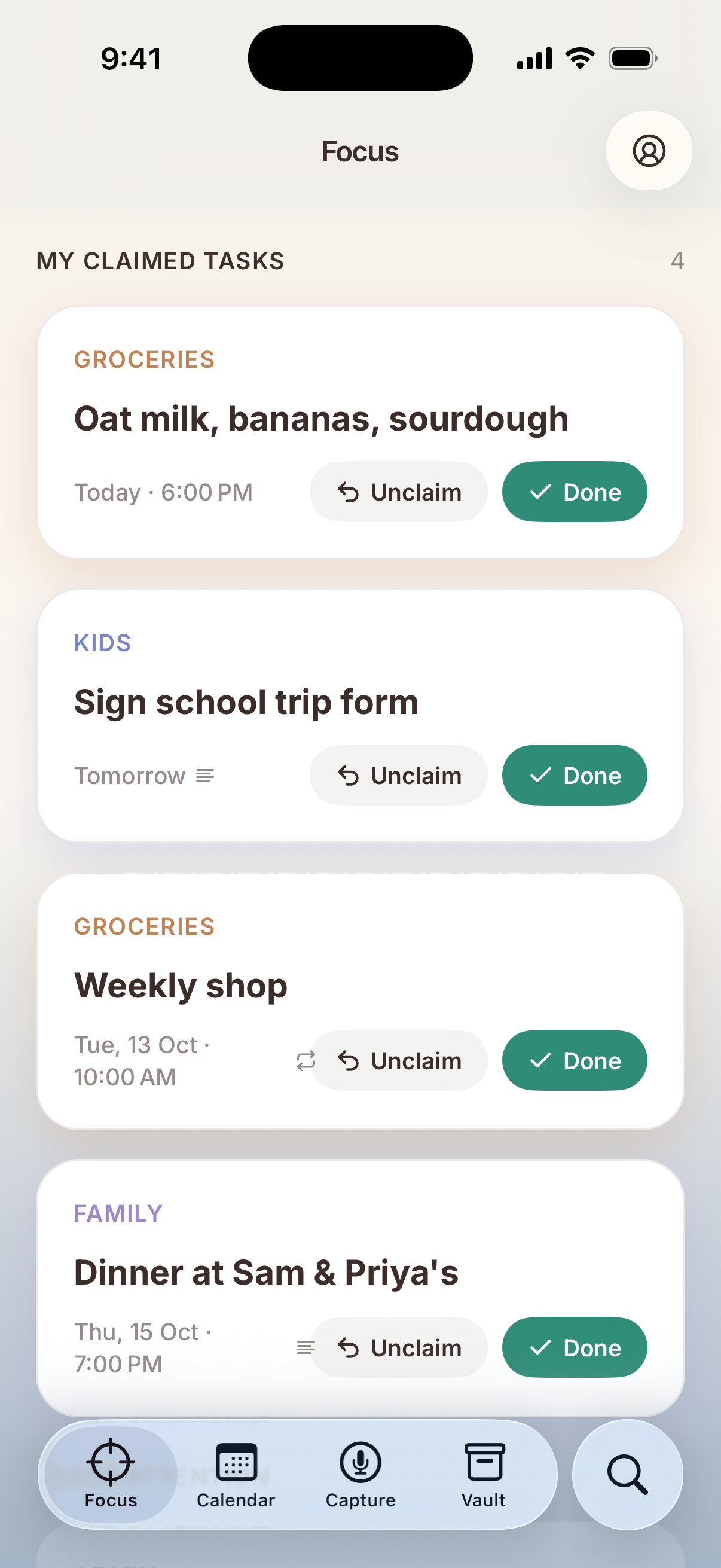
Your day at a glance
Know what’s yours today.
Focus shows what you’ve claimed, in the order it’s due, and brings unclaimed or overdue jobs to the top before they turn into an argument. No more “I thought you were doing it.”
Claim in a tap
Needs attention
Due-time reminders
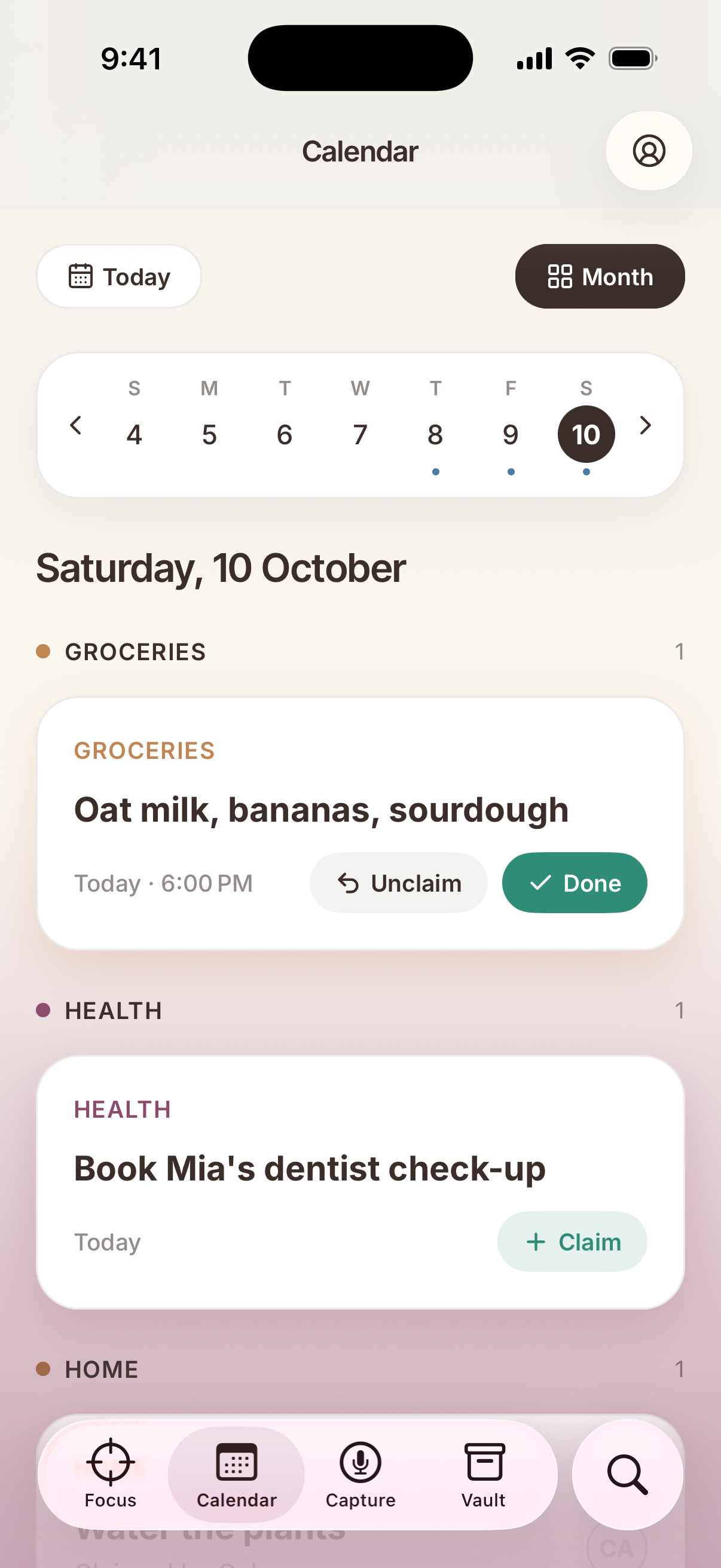
One shared calendar
The whole home, on one page.
Every chore and errand on one calendar, grouped by category and synced to both phones the moment either of you changes something.
Week & month views
Repeating chores
Live sync
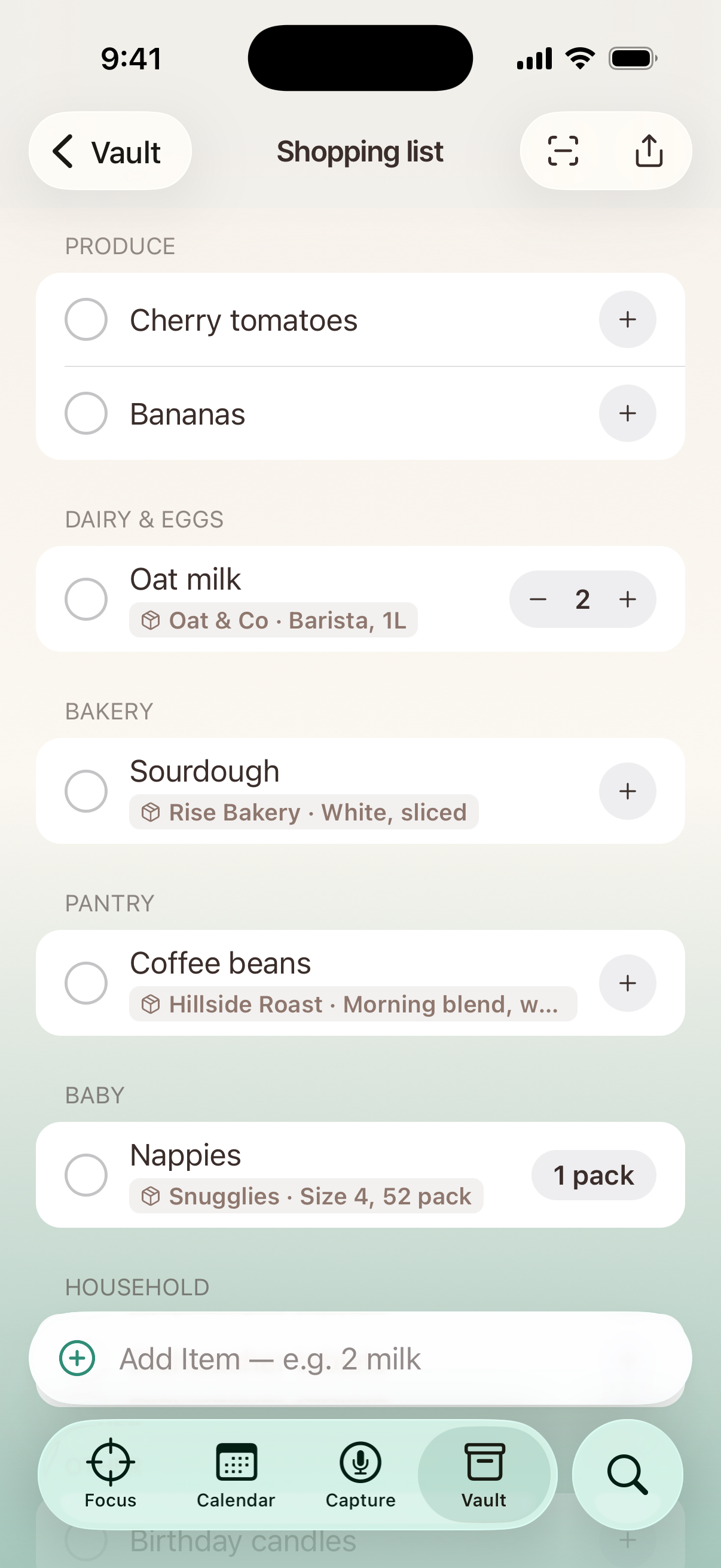
One shared shopping list
One list, both phones.
Add things by voice or in a tap and they land in the right aisle, with your usual brand attached. Tick them off in the shop and the list updates at home.
Sorted by aisle
Your usual brands
Restock suggestions
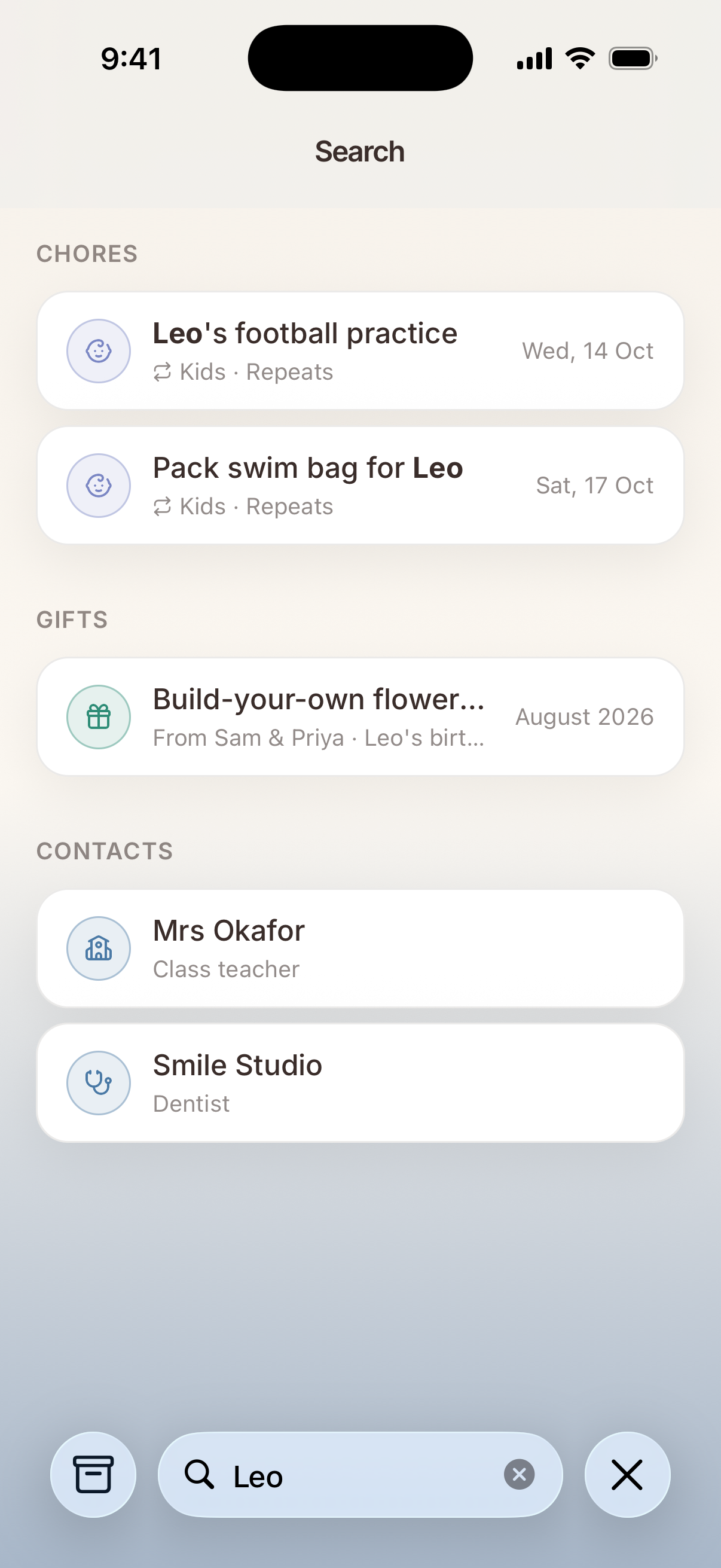
Search everything
Find anything in seconds.
One search across chores, contacts, brands and gifts. Typos and half-remembered words are fine.
Chores
Contacts
Brands & gifts
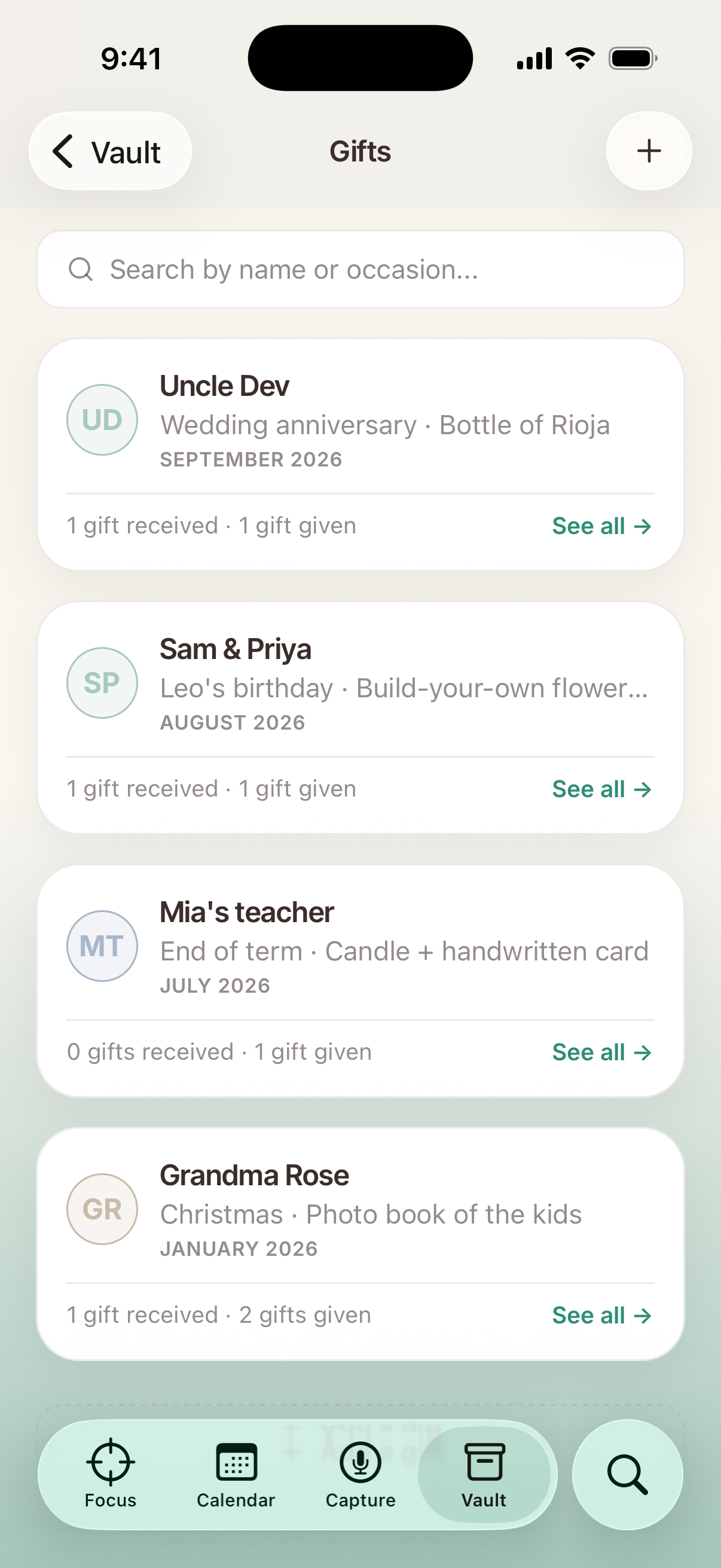
The gift vault
Remember every gift.
Ideas you overheard, gifts you’ve given, who they were for and when, with a photo. Birthdays stop sneaking up on you.
Gift ideas
Given history
Photos
Up for grabs6 left
Bins outWeekly shopSchool formPay house helpBook plumberMom’s gift
EVEve
CACal
Who’s carrying it?80 / 20
Built for two
Share the load, not the nagging.
Invite your partner with one link and you’re in the same home. Claim what you’ll do, see what they’ve
picked up, and stop keeping score in your head.
Invite with a linkSend it over chat and they’re in your household.
Always in syncChanges show on both phones right away.
Claim, don’t assignPick up a job in a tap, or hand it back.
Reminders for bothA gentle nudge when something’s due.
The Vault
Your home’s memory, shared.
The details one of you always has to remember: who the plumber is, which coffee you buy, what Grandma got last
year. Now they’re written down, in both your pockets.
Gifts
Ideas you overheard and gifts you’ve given, with who, when and a photo.
Cashmere scarf, dusty blueGiven to Grandma Rose · Birthday
Pottery class for twoIdea · Anniversary
Contacts
House help, doctors and tradespeople, with schedules, pay day and notes.
S
SunitaHouse help · Mon–Sat, 8 AM
M
Dr. MehtaPaediatrician
Staples & brands
The exact things your home runs on, so whoever shops gets it right.
Coffee beansMedium roast · 500 g
Dish soapLemon · the green one
Shopping list
One shared list. Tick it off in the aisle and it updates at home.
Oat milk
Bananas
Sourdough
Coffee beans
Snap a visiting card, a product or a handwritten list, and it fills itself in.
Just your householdYour chores, Vault and photos are visible only to the people in your home.
No ads, no data salesWe make money from Premium, not from your information.
Audio isn’t keptVoice captures are turned into chores, then the recording is discarded.
Leave any timeDelete your account from the app in a few taps, and your personal data goes with it.
Free to start
One subscription. Both of you.
Everything works on the free plan. Premium is for households that capture a lot, and it covers everyone at home.
Free
₹0 forever
Shared chores & calendar
Claim, hand back & reminders
The Vault: gifts, contacts, staples, shopping
Invite your partner
20 captures a month
Early-access pricing
Premium
Everything in Free, plus
500 captures a monthUp from 20. Say it or type it, and it’s sorted.
One plan, the whole householdEveryone you live with gets Premium too.
Our launch priceLock it in while you help shape what we build next.
Monthly or yearly, billed through the App Store or Google Play. Free trial for eligible accounts. Cancel any time in your store settings.
Questions
Good to know.
Who is Eve & Cal for?
Couples who share a home, and anyone else running a household together. Everyone in your household sees the same chores, calendar and Vault, and each of you claims what you’ll do.
What’s free, and what does Premium add?
Everything in Eve & Cal works on the free plan, including shared chores, the calendar, reminders and the Vault, with 20 voice or text captures a month. Premium raises that to 500 captures a month. Pricing is shown in the app in your local currency, and eligible accounts can start with a free trial.
Does my partner need their own subscription?
No. One Premium subscription covers everyone in your household at no extra cost.
Who can see my household’s information?
Only the members of your household. We don’t sell your data or use it for advertising. Read the Privacy Policy for the full details.
What happens to my voice recordings?
When you capture by voice, the recording is sent securely to our AI provider to be turned into chores, and then discarded. We don’t keep the audio.
How do I cancel my subscription?
Subscriptions are billed by Apple or Google, so you manage or cancel them in your App Store or Google Play subscription settings. Deleting your account doesn’t cancel a subscription automatically.
How do I delete my account?
In the app, open Profile, scroll to Account and tap Delete account. Step-by-step instructions, and how to request deletion by email if you no longer have the app, are at evecal.in/delete-account.
Make the invisible visible.
Get Eve & Cal on both your phones and start sharing the load tonight.
Coming soon to theApp StoreComing soon toGoogle Play